
How to set up Folders and Folder Filters in Simple Mail
chiaroscuro —Sun, 04/24/2016 - 00:21
This will be a Tutorial on setting up Folders and Filters in Simple Mail
Simple Mail is set up in such a way that one can by the use of Filters sort ones mail into different Folders
This is a most useful Function
The first step is to create a new Folder in which one can save ones Mail
The name will probably be of the person whose Mail one wishes to keep in the Folder
To Create a New Folder click on the left of the Simple Mail Page on the top of Folders
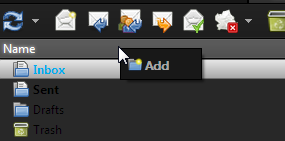
Add and Name a suitable Folder, and then Press OK to Save
This the First Step
Simple Mail is set up in such a way that one can by the use of Filters sort ones mail into different Folders
This is a most useful Function
The first step is to create a new Folder in which one can save ones Mail
The name will probably be of the person whose Mail one wishes to keep in the Folder
To Create a New Folder click on the left of the Simple Mail Page on the top of Folders
Add and Name a suitable Folder, and then Press OK to Save
This the First Step
- Printer-friendly version
- 0 votes