
FD Installation
gumanov —Thu, 07/24/2008 - 17:35
Several things you must know before installing Fast Dial:
The older, stable release is: FD v1.90.
Works with both Firefox 2 and Firefox 3.
The most current,stable release is: FD v2.11.
The 2.x version releases are only compatible with Firefox 3.
This is because some of the features of FD v2.0 require the latest version of Firefox...
Recommended Setup: Fast Dial v2.11 w/ Firefox 3
If you're not yet using Firefox 3, and are able to upgrade, please do so here: Download Firefox 3.
There are several places where you can get Fast Dial..
These include:
Telega's Site,
The Mozilla Add-ons site, or
Directly from this site.
First, you must Choose a download source above ( i chose mozilla addons for this article - although v2.0 is not available there yet)
Ok, now lets get started with the installation.
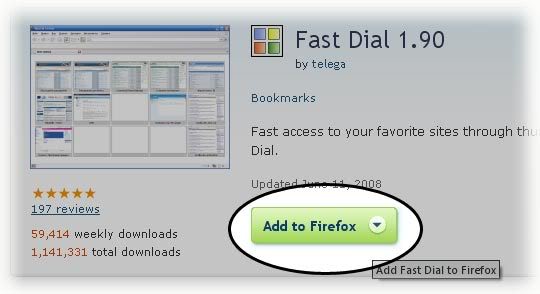
1. Click "Add to Firefox" (or similar)
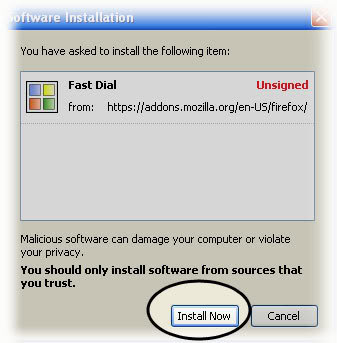
 2. Click "Install" on the popup. (Or "Allow" if the top bar shows up)
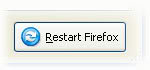
 3. After installation, click "Restart" Firefox
 When firefox opens, you should see the same tabs open as before the restart.
___________________
When firefox opens, you should see the same tabs open as before the restart.
___________________
The famous "Scaling Method" popup (FD v1.x Only):
You will now see a window which is asking you which "scaling method" you would like to use.
Scaling refers to how Fast Dial resizes the thumbnails.
 Default - This can sometimes produce a low quality thumbnail in FF2.
Java - Usually better quality - Uses more system resources. (Must have Java installed)
Userlogos.org - No Longer Available (Do NOT Use!)
Recommended Scaling method: "Default"
___________________
By default, Fast Dial will display on all new tabs, it will look similar to this:
Default - This can sometimes produce a low quality thumbnail in FF2.
Java - Usually better quality - Uses more system resources. (Must have Java installed)
Userlogos.org - No Longer Available (Do NOT Use!)
Recommended Scaling method: "Default"
___________________
By default, Fast Dial will display on all new tabs, it will look similar to this:
 So, go ahead and open a new tab to see Fast Dial!
Ways to open a new tab include:
1. CTRL+T
2. File > New Tab
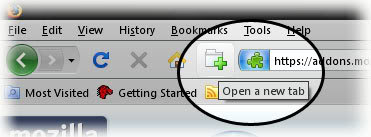
3. The New Tab toolbar button.
So, go ahead and open a new tab to see Fast Dial!
Ways to open a new tab include:
1. CTRL+T
2. File > New Tab
3. The New Tab toolbar button.
 _____________________________________
Having trouble with the Fast Dial installation? Troubleshooting information is available here: Link.
Or, you can get support in the forum here: Link.
_____________________________________
Having trouble with the Fast Dial installation? Troubleshooting information is available here: Link.
Or, you can get support in the forum here: Link.
2. Click "Install" on the popup. (Or "Allow" if the top bar shows up)
3. After installation, click "Restart" Firefox
When firefox opens, you should see the same tabs open as before the restart.
___________________
Default - This can sometimes produce a low quality thumbnail in FF2.
Java - Usually better quality - Uses more system resources. (Must have Java installed)
Userlogos.org - No Longer Available (Do NOT Use!)
Recommended Scaling method: "Default"
___________________
By default, Fast Dial will display on all new tabs, it will look similar to this:
 So, go ahead and open a new tab to see Fast Dial!
Ways to open a new tab include:
1. CTRL+T
2. File > New Tab
3. The New Tab toolbar button.
_____________________________________
Having trouble with the Fast Dial installation? Troubleshooting information is available here: Link.
Or, you can get support in the forum here: Link.
So, go ahead and open a new tab to see Fast Dial!
Ways to open a new tab include:
1. CTRL+T
2. File > New Tab
3. The New Tab toolbar button.
_____________________________________
Having trouble with the Fast Dial installation? Troubleshooting information is available here: Link.
Or, you can get support in the forum here: Link.- Printer-friendly version
- 1 vote